• Skip to primary navigation
  • Skip to main content

MelvinBlog

A blog that chronicles my journey on online marketing, blogging, social media, technology and life.

  • Author
  • Photos
  • Contact

Blog Tools

You Need a Pitch for Your Blog, Here’s Why

by Melvin · Apr 21, 2010

Most bloggers are blogging in a certain niche and if you’re reading this blog for quite some time you probably have heard me say that having a clear niche is very important to be successful in blogging. Gone are the days where you could just blog about anything and expect a heap of traffic in return.  When I was just getting started, I pretty much did things that way. I felt, “oh, those are for just those sleazy marketers or just for get-rich quick scammers”.  But it didn’t take long for me to realize that hey maybe I really need one.

Darren Rowse 31 Days to be a better blogger eBook calls this an elevator pitch, wherein you have a very short space and time to pitch what is your blog really all about to visitors, especially new visitors. This also helps you as blogger to have a nice idea of what to post and what to not. If you’re blogging about car insurance, then pitch it in the way where the visitors can find it unique. You also need to find an enticing angle to present it. Just pitching it as a “great [niche name] blog” is not enough.

Ok I know what you are thinking. I know you’re saying “Im not a salesman and I never want to sound that way!”. I don’t want either! In fact, I really haven’t sold almost any stuff here in my blog. I don’t sell info products (I did for 1 month last year), I don’t do consulting, I don’t psyche you that what I provide costs $XXXX amount).

The truth is a blog pitch doesn’t really need to become like a traditional pitch. If you look at the most successful blogs in this niche, you really wouldn’t think they’re hardselling or pitching something that sounds like they’re selling. The ever famous Shoemoney’s tagline is “Skills to pay the bills”. Not that he says he’s a make money online blogger, but still people come to him as an authority.

By bringing in your blog’s pitch, you’re making a clear and concise detail on what your readers should expect in your blog. You’re telling them ‘hey I’m in this industry, Im an expert in this field’. But of course, your pitch must stand out from the rest so you should not just make use of old generic ones.

Another good reason why you need to have one is to target your audience very well. All of us want a huge number of audience. Unfortunately, it’s all useless when some of them are not really aligned to what we offer and present. Isolating the right people as our audience is crucial for having a tight and well-targeted blog readership.

Final Words

So by now, you should’ve already understood the value of a pitch or elevator pitch for your blog. If you still feel you don’t have a pitch for your blog or you are unsure whether its the proper one, then take some time to think one. If you, yourself is not clear about it, then how would you expect your readers to get it too?

What do you think about elevator pitch for blogging? What is your own pitch for your blog? My blog pitch is “Internet Marketing for Bloggers” or some variations of it. I would be pretty interested to know yours as well.

Filed Under: Blog Tools, Blogging Tips, Internet Marketing, Social Media, Traffic Tagged With: blog pitch, elevator pitch

Widget Logic Plugin, Strategize Your Sidebar Widgets

by Melvin · Apr 10, 2010

All bloggers make good use of the sidebar in their template. Whether it is 2-column, 3 column-sidebar or just multiple sidebars, our aim as a blogger is to make good use of them all. Thankfully for us, WordPress has made it so much easy with the use of widgets wherein all we have to do is drag and drop things.

Of course just like anything, people sometimes abuse the use of widgets and sidebar elements. How many bloggers have you seen cluttering their sidebar too much? Or how many useless widgets usually do appear on most sidebars? The ease of using widgets have enabled bloggers to become a bit trigger-happy with putting so much at the same time.

Widget Logic WordPress Plugin

The topic above leads us to the widget logic plugin. What widget-logic does is basically lets user use conditional tags to control the pages where a certain widget will appear on. It sounds a bit basic but trust me this one is a helpful plugin.

Looking at my blog you would see that some widgets that appear on home don’t necessarily appear on the other pages and vice versa. If you’re more technically literate, you could actually play more with the conditional tags to achieve your desired result.con

For example here in my blog, I don’t display the top commentator widget anywhere outside the home page basically because the home page is the strongest page in my blog. Another is my “Blog Marketing for Fame” eBook widget wherein I don’t display it in the index page primarily because I already have it in the middle sidebar part. But when you go to the posts and pages, you could see it at the top most part of the sidebar. You can do your own variations depending on how you prefer it.

Its all about maximizing each and every part of your blog

When I went with the blog’s redesign, my aim is to maximize every space without annoying/cluttering my readers’ mind. So with widget logic plugin, I was able to really implement things that I want. It gave me the flexibility of mixing and matching different elements in the sidebar.

How about you, have you used this widget already? If yes, maybe you can tell me some of your implementation techniques and tips. If not, I would highly recommend using it. Check out the widget logic plugin page.

Filed Under: Blog Tools, Blogging Experience, Designs, Handy Tools, Internet Marketing, Traffic Tagged With: blog widget, sidebar elements, sidebar wordpress, widget logic, widget wordpress

MyBlogGuest Review: Promote Your Brand by Guest Posting

MyBlogGuest Review: Promote Your Brand by Guest Posting

by Melvin · Feb 14, 2010

This is a paid review sponsored by Ann Smarty of MyBlogGuest.com

Just in case you‘re living inside a hollow cave, you probably aren‘t aware yet that guest posting is the most powerful FREE way to get a blog known. By far, it’s a very powerful tactic that can get your blog brand across a wide range of audience. In my free eBook called Blog Marketing for Fame (get your copy now!) I stressed so much how it made my blog grew that quick.

For today, Ann Smarty pinged me last week to do this review of her site called as MyBlogGuest. I‘ll drive straight into the site and will now discuss what it is all about and its functionalities. So basically MyBlogGuest is a forum where you can find guest posters and fellow bloggers. The idea behind it is to build a community of guest posters that will collaborate with each other. In the end, it should be a win-win situation for everyone.

Site‘s Design & Aesthetics

At first look, you actually wouldn‘t think it‘s a forum and for me the only time I realized it was a forum was when I already completed filling out my profile. The site‘s layout is very simple yet it doesn‘t look like an ancient website. The forum itself is small yet is very targeted to guest bloggers. I personally like it because being targeted, you get to squeeze every benefit from it and will no longer need to avoid forum lurkers who just annoy members.

Another unique part is the categories and tags page. While you can browse each thread to find out your interest, you can also benefit a lot by sorting the blogs by categories. For example, MelvinBlog Dot Com is inside the internet marketing category so all you have to do is to pick your niche/category and you would immediately see blogs which are talking on the same stuffs. It also works the same with tags where you can specify the tags that your blog uses.

Functionality and Benefits

As I’ve said I’m a fan of small yet tight communities. MyBlogGuest isn’t like other forums which are mostly cluttered. As I was browsing different topics (there are just mainly 5 topics), I noticed that the members are supportive of each other. Ann was also out there responding and collaborating with the members. There was even a “Help Needed” topic there where you can go out and request for social media votes.

Another thing Ann mentioned is that they would try to keep the quality as high as possible. The forum has made it easy to report people who violate the rules, or those who don’t follow the guidelines of guest posting. So if you go out there and try to game the system, then more likely you are gonna get banned.

Lastly there’s also another part w/c is called Blog Round Ups where Ann would feature the best guest posts arranged through the forum in her blog. Although I don’t think it’s a huge feature, it can still help you get traffic especially if your blog is just getting started.

The Bad & Ugly, Some Suggestions

Well not really bad and ugly, I just can’t figure out a good title, lols. The one thing I don’t like is the quality of blogs in there. In fact I’ve seen people requesting for guest posts on a blog with an Alexa 1 million rank but it’s understandable and it’s the inevitable part of this feature. But I would definitely love to have a sort kind of a filtering system where you can filter good blogs from average ones.

Actually there is, the Blog Power. By specifying your blog and some of your social media accounts, you are getting a certain rating for your blog. The higher, the better obviously. But I find it glitchy since Google PR and other stuffs don’t really determine the audience behind the blog. Another is the part where you link your social media account to the forum. Actually it’s not linking, it’s just inputting (w/c is obviously a flaw).

Since I’m not a social junkie, all of my social accounts power just combined for a mere 7 points. So what I basically did was just borrow the user name of the top users in those social networks. Look:

Obviously the built-in Blog Power isn’t really a reliable metric and even if they fix it, it is still not (metrics aren’t that precise in determining)

It’s also the anti-thesis for direct communication types of guest posting for bloggers. Since most bloggers do have a contact form, then why go through a third party in a forum? Besides, bloggers check their email more often than forums right? Anyways I don’t really see it changing the current procedures in guest posting. People will still contact other bloggers directly and stuffs like that.

Final Words

MyBlogGuest is a decent site and the fact that it’s not a make money program is one thing that I liked so much about it. Ann Smarty is a pretty reputable person in this industry and I know her intention is honest. As the forum grows bigger and bigger and more tweaks are implemented, I think the site can become a key player in the rapidly-growing guest blogging community. Of course it still depends on a lot of factors, mostly the users (both quantity and quality). If she can get large bloggers to thumbs it up then it’s going to get huge in no time.

Sign up now with MyBlogGuest and tell me your experience about them.

Filed Under: Blog Tools, Blogging Tips, Guest Post, Paid Post Tagged With: guest posting, myblogguest

Spam Spam Go Away

by Melvin · Jan 2, 2009

Everyone who has a blog knows that pain of dealing with spam comments and trackbacks. Of course, the more popular the blog is the higher the spam content it may receive each day. For this blog, I think it has about 3000 spam comments caught by Akismet since it started last May. Now while Akismet does a very nice job of catching spam comments from your blog, we cannot ignore the fact that we still always double check it, in case it catches false postives. Right? Although normally the rates are very low then and it seems that Akismet has improved so much since the day it started.
So here now I am going to show you other guides/tips that can help you fight and reduce spam on your blog:

  1. Comment-Timeout – I am pretty surprised not a lot of people use this plugin but what this plugin does is simply close the comment form of the blog posts that are older than 3 months or so. You can set it to whatever you may wish for but certainly its a nice plugin that helped me reduce the number of spams I receive every day. Comment-Timeout is a nice plugin I swear!
  2. Hold a Comment if it has 1 link! – Now this is what i have just learned last month. Basically there will come a time a guy will follow you and comment genuinely. In wordpress, upon approving the comment of a certain guy/email, it basically just accepts each and every comment of that guy then. So after quite some time, the spammer then use that to spread spam links on my blog and fortunately I thwarted him before he could do so much. Always hold a comment for moderation if it contains a link!
  3. Use the Comment Moderation Box – In the settings of your discussion in wordpress admin, you’ll see a semi-sized box wherein you can put ip, emails and etc. What you might want to put here is the list of proxies provided by TOR. You can also search for other open proxy ips and try to list them as well. Proxy is a great way to surf anonymously but oh boy spammers just take advantage of it so well!
  4. Wp-ban – This is another wordpress plugin and it does display a custom ban message when the banned IP, IP range, host name or referer url trys to visit you blog. You can also exclude certain IPs from being banned. There will be statistics recordered on how many times they attemp to visit your blog. It allows wildcard matching too. I don’t use it here, but if you have a very popular blog or maybe you are the target of the spammers, then it can be useful.
  5. Trackbacks – trackbacks are one easy way to spam and spread links on other people’s site. What happens is that spam blogs will send a trackback to you w/your own content. Before I wasn’t aware w/it, so I just approve every trackbacks I receive. You must always take a look at a site before accepting their trackspams!

So that’s it. What you will find out is that most of the solutions are just inside wordpress itself. If you know a little programming then you expand things more depending on your knowledge. Just always back up! 🙂

Filed Under: Blog Tools, Blogging Experience Tagged With: spam, spam blogs, spam comment, spam trackback

Make Some Money By Placing Banners

by Melvin · Sep 3, 2008

I am not really a fan of these “place a banner” and get monthly payments or anything like that but sometimes stuffs like this will help people or new people build something for startup and it does not cause anything to join. So I thought I would be making a post about it.

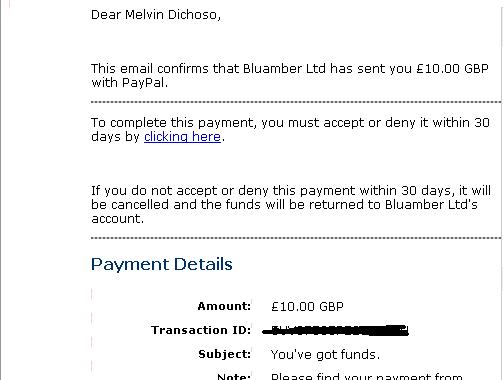
Well What I am talking about here is freebies 4 Webmaster. Last July they contacted me introducing their services, I though they were just scam or maybe they are really so I turned down their offer. But then last month I was playing with monetization here in this blog and you may notice me placing different things on the sidebar and doing A and B testing. Then one friend referred this now to me. I pasted the 468X60 on the lower part of the sidebar. I did it last August 20 and then yesterday I received 10 British Pounds from them which means they really pay. They do also promise to pay monthly for keeping that banner on my site. Lets see.

Filed Under: Blog Tools, Blogging Experience, Monetization Tactics Tagged With: banner blog, make money blog

What’s up Max Banner Ads!

by Melvin · Jul 1, 2008

So everyone seems to be intrigued with this new plugin from Maxpress. Max Banner Ads is a plugin that makes it very easy to add and rotate banners in your wordpress blog. The good thing is you don’t need to alter any codes in your theme. Sounds good right? That is just the prelude. Another thing that it does is that it automatically tracks the statistics of the specific banner. It shows the impression, CTR and so on. After reading Chow’s post about it I immediately take a look at the site, grab my copy of it and installed it.

As you can see, the plugin automatically lets you add banners from almost everywhere in your site.  You can rotate as many as you want. And add the fact that it is free. Yes, it’s free. So you’re thinking now everything about it is positive? Well not quite. The plugin after activating it, actually is not still activated. You will be asked to subscribe to Maxpress newsletter, and it’s not optional. If you don’t want to, then you cannot use the plugin! For me I find very annoying. That simple subscription would probably have a huge impact on those who want to use the plugin. Another thing is that under the banner there is a link ala Project Wonderful. As of now I haven’t tried if you can remove the linkback to their site. Geez…

So all in all I find this plugin still useful. Though, OIO direct is still better by far, Max Banner Ads is free and would be very beneficial to those who do not have a $37. Yes, the subscription looks spammy and the linkback is annoying but sure the plugin worths a great look. If you have any other things to say about this plugin then say it…

Filed Under: Blog Tools, Monetization Tactics Tagged With: blog, money online, plugin, wordpress

  • « Go to Previous Page
  • Page 1
  • Page 2

Copyright © 2026 · No Sidebar Pro on Genesis Framework · WordPress · Log in