• Skip to primary navigation
  • Skip to main content

MelvinBlog

A blog that chronicles my journey on online marketing, blogging, social media, technology and life.

  • Author
  • Photos
  • Contact

Paid Post

Competitive Local Searching. GeoEdge Review

Competitive Local Searching. GeoEdge Review

by Melvin · Oct 18, 2011

geoedge reviewThis is a paid review. If you’re interested in having your product/website reviewed, kindly see our packages here.

Update: In this review, GeoEdge was compared to an outdated version of GeoSurf. The version of GeoSurf that I reviewed was version 3.0 which is now an outdated version according to them.

Viewing websites in different geographic locations has many uses. An “obvious” use is for us, online marketers who are doing research for the market that we’re targeting. Another use is for SEO’s running optimization campaigns for their clients or even for themselves. Also, we have those affiliate marketers that use pay-per-click on search engines. They want to know how their ad is performing and if it shows often. Lastly, we have these other group of people who are monitoring their brand throughout different locations and seeing if their campaigns are being ran as planned. Actually, surfing websites locally has almost unlimited uses.

The use of tools that will do all of this is starting to become a necessity. Sure, we have all those ‘free’ web proxies that are available ever since but how do we know they’re not infecting our system with all those malwares and viruses? How do we know they’re really reliable? Perhaps the reason why they’re free is because they’re not really delivering the goods.

Last month I talked about GeoSurf and how it differs from the rest by instead providing a toolbar for doing local searches. For this month, I’ll be reviewing a somehow similar service called GeoEdge.

What is GeoEdge?

GeoEdge, as a whole, is a company that specializes in creating technologies in the field of online media and specifically geo-location (targeting). Their global visibility solution is obviously the GeoEdge Pro product which I’m about to review.

GeoEdge (the PRO version) allows you to view up to over 100 locations (which is more than what GeoSurf offers) and you can do that by installing their toolbar on your browser. As of the moment, there’s a toolbar for Firefox and  Chrome (beta). After installing, you are now ready to use GeoEdge.

Aside from GeoEdge Pro, they also have other tools that you can associate with it. One is GeoEdge search and the other one is GeoEdge Analytics. The first one is basically just a package that’s more suited for search optimizers and marketers. The second one is more targeted to Ad networks and Media Buyers. Let’s have a look on what’s inside.

Inside GeoEdge

GeoEdge  gave me a free trial wherein I was able to explore in many different countries. My experience with the toolbar is mostly good and I would say its pretty accurate. A quick test that I conducted is browsing Google.com on several locations and GeoEdge never failed in delivering me to right Google page based on the location that I selected.

The toolbar is sleek and I like that its organized by continents. You don’t need to scroll down to a list of gazillion countries. Instead, they’ve grouped them accordingly so if I want to select ‘Argentina’ as my location, I can simply just go to Latin America and then select Argentina.

Aside from this, there’s also a mobile emulation feature wherein you can see the look of a page on a specific mobile handset. I cannot speak on its accuracy since I only own an Android phone so I don’t really know if the page looks the same in Symbian or iOS.

Since GeoEdge is a browser add-on, they need to keep up with endless updates from the browser it is supporting. I think they’ve done a good job of that since the version that I tried seemed to work with three different Firefox versions without having any problems at all.

I was also using an internet connection through a USB when I tested GeoEdge and it just worked fine (GeoSurf didn’t work well with a USB dongle  btw.) As an aside, there are some other Firefox plugins (like Foursquarefox) that don’t work well with USB dongles so kudos to the creators of GeoEdge for that.

As far as the connection speed, not sure if its normal but when you change to some other locations, the page loads slower. I know that the servers are located on different places that might have been far from my location so that’s probably the reason why it happens.

I would say all in all that I like GeoEdge. The toolbar idea is superb and I like how they have the details organized in the toolbar. Aside from that there’s this ‘Snap-it’ thing that looks real unique. What this does is build a consolidated view of pages and ads from several geographical location. The view will be based on your selection of locations. I haven’t tried this extensively but a quick look on Snap-it would lead you to their bigger product called GeoEdge Analytics which I will not be discussing anymore.

For a good demo, you can also visit the GeoEdge demo page to see how it works.

Plans and Pricing

GeoEdge has interesting packages as compared to GeoSurf. They actually have a free version called GeoEdge Search where you can access up to 8 locations but you can only use these locations on search engine ranking page. That means you cannot really use it to a specific URL but rather to search results only. Its very limited in that sense but still I know lots of people can benefit from this. And hey its for FREE.

As for the pro package, the cheapest one starts at $59/month where you can view up to 3 locations and have a search limit of 200mb.  Here’s a screenshot of their entire packages:

geoedge cost

They have this unique package which is the custom one wherein you can choose your own combinations and build it your own way. The price for this obviously depends on that certain combinations that you want.

Lastly, every package has a free trial option so within that specified period you can cancel when you feel its not worth it.

Conclusion

GeoEdge is actually almost identical with GeoSurf. They both make use of toolbar and they’re pretty expensive if you’re gonna use them and you’re not really making any money. However, if you are in the industry wherein tracking locally is always a task, then this is definitely a must have. If you are working on a large company, you can also suggest to use this tool. In short, tools like this is not for everyone.

Overall, I find GeoEdge just fine. I’m a web guy that has gotten used to using proxies from websites and having the privilege to use a tool like this, I would say its almost always refreshing. Maybe they can roll out more features that would further more set them apart from the competition but right now its already solid. Also, finishing that Google Chrome toolbar would help a lot since lots of users are using Chrome these days.

How about you? Do you think GeoEdge can help you do your local searches more competitive?

Filed Under: Internet Marketing, Paid Post Tagged With: geodge review, local searching tool

PHP Dir Submit Review – A Directory Submitter Software

PHP Dir Submit Review – A Directory Submitter Software

by Melvin · Aug 7, 2011

Back in the early days, directory submission is one of the most powerful ways to both drive traffic to a blog and to rank in search engines. The algorithm of Google back then makes it very easy for sites listed in directories to be crawled and to be considered an authority site. With that people rushed quickly into this and tried submitting their sites to as much directories as possible.

Nowadays it isn’t as effective as it used to because Google has tweaked their algorithm. But make no mistake of it, it can still benefit you if you do it properly. With that I would like to introduce you this software called PHP Dir Submit.

What is PHP Dir Submit?

PHP Dir Submit is simply just a web application that allows you to ‘semi-automatically’ do directory submission service. As its name suggests, its a PHP script and with that being said its compatible literally to all web server setup. This directory submitter software can be used depending on how you want it to be utilized.

If you own lots of mini niche sites that make some good money then you can use this script to submit your site to 300+ directories so it can start picking up in the search engines. Again this is done automatically with a press of a button. You no longer need to go into these different sites and type the same information again and again.In short, it will save you a bunch of time.

Another good use of it is submitting sites for your clients. It has an automatic Paypal integration so you can easily build a business around submitting sites for them. If done correctly, we all know this model of business makes a lot of money although it would really really take a lot of work for you to be able to reap that benefit if you’re about to go to this path.

PHP Dir Features

Now do take note that aside from the 300 web directories, they also have a list of 300 article directories and another 300 social bookmarking sites. Of course, you have the ability to add more sites to the list and PHP Dir Submit makes it very handy for you to do so through their admin console.

According to their site, these are the features for the site owner:

  • Easy to use administration control panel
  • Preloaded with hundreds of directory sites
  • Add unlimited number of directories and bookmarking sites
  • Support these platforms: PHP Link Directory (PHPLD), ArticleMS, Pligg, Scuttle, Scuttle Plus, PHPDug
  • Send email newsletter to all users (or individual user)
  • Fully search engine optimized
  • Paypal integration
  • Free lifetime directory updates

Again this is a PHP Script so it should be easy to install on your end. In case the ease is still not enough, there’s a fully fledged FAQ page on the site that walks you through the most commonly asked questions.

Pricing

Pricing starts at $49 for a single site license and $99 for a multi-site license. My advice is to try out the single site license first and if you’re happy with the script and you think its a pretty good model, then you can grab the multi-site license if you’re planning to create multiple ones.

As far as the disparity with the features, here’s a screenshot:
phpdirsubmit pricing

All in all, it seems to be a pretty decent software. I was able to navigate through the demo panel and on a hindsight, I could say it should capture your interest if you’re looking into this type of model.

The question on whether the product is worth it or not is kinda related to the question “is a directory submission business still effective these days?”. Of course using that as a business is just one of the options for this software since you can again, use it on your own web properties as well.

But it’s all up to you. I highly suggest you to check out PHP Dir Submit and the reason being is because they allow you to navigate through their admin demo console and the normal demo for users. With this, you can instantly navigate around and see if what it offers is worth your time.  Or if you’ve had your experience with it, let us know through the comment form.

Filed Under: Blog Tools, Paid Post Tagged With: directory submission software, php dir submit, phpdir submit review

Surfing Locally Without Being Local. GeoSurf Review

Surfing Locally Without Being Local. GeoSurf Review

by Melvin · Jul 27, 2011

This is a paid review. If you’re interested for having your product/website reviewed, kindly see our packages here.

The internet has been there for quite a while now and its hard to talk about it without really touching on how it opened lots of opportunities for us, online entrepreneurs. Its amazing to imagine that by having an internet business, we’re not really limiting ourselves to a specific demographic but rather catering to a global one. Also, it allows us to just stay and work where we want to and not really move on to different places.

Geosurf came up to me and asked me I could test out their service and write this review. For those who don’t know, Geosurf is a service that allows you to browse the internet with different locations. Basically you will have to download and install their toolbar before you can do those things.

Now bare in mind that prior to Geosurf, there are different ways to browse the internet using a different geographical location. One of them is using those third-party websites that allow you to do it. The downside  of using that is its annoying with popups and different bunch of ads. To add, those sites usually have security issues and are long believed to be unreliable. But that’s what many people are still using right now.

The other one that I used is the Tor Project (used to be tor.eff.org). Its a free and awesome solution back then but for some reason the service started crapping out and basically lots of people shied away from using it anymore.

You might be asking where can you use it? Surfing in different locations has a lot of uses but for me personally I can use it when doing affiliate marketing and internet business.

Some of you may know me as a hardcore affiliate marketer back in the day and the problem usually is that when you’re promoting a certain product, you cannot really see how it looks and who your competitors are. You wouldn’t be able to see other things as well such as your position in an ad, how your ad looks like in different places and things like that. I would normally use a proxy to get to do that but its very very annoying to do so because of a).advertisements b).slow and unreliable connection. I know some people are using proxies differently but in an internet business that is how its mostly used.

This is where Geosurf comes in

What Made GeoSurf Different?

Update: What you are about to read below is a review of GeoSurf 3.0. GeoSurf came up to me about their new version 4.0 which is a huge upgrade over the previous version.

In their latest version, GeoSurf  is no longer just a proxy toolbar since it allows you to explore the entire ‘ecosystem’ of display advertising on different sites in various locations. GeoSurf believes this new features puts their product far above the competition.

Geosurf is different because its in  form of a toolbar. Basically what you do is download their plugin and install it in your browser. Another difference is that it has a sleek interface and is very easy to use and understand (especially with the 3.0 version). Here’s a video to know more about them:

As if its still not enough, they also have other features such as an Android and iPhone app, mobile simulator and the Geosurf Direct Connect API which I know is going to be very useful for more techy users.

Plans and Pricing

Geosurf starts at $29/month while the high end price for advanced users is $89/month. They also offer an enterprise plan for Geosurf although the price obviously depends on how large the company is.

 geosurf pricing

Final Words

My overall experience with Geosurf is good since I was able to use it without having any problems at all. Speed is there (although it varies depending on the country) and you would really enjoy surfing on a different location minus all these popups and annoying advertisements. You can even surf on a per city basis (for US locations) although I haven’t thoroughly tested it.

The only thing that might get you a bit confused is it logs you out on a site where you are normally logged in (i.e. Facebook, Twitter, etc.) which is very understandable since you’re changing locations and IP’s. If you don’t want being logged out, I suggest that you install it in a different browser. In my case, I installed in IE since I don’t use IE when doing my normal social media stuff.

Price-wise is it worth it? I think so. Besides they have a free trial that you can test out so you can see if Geosurf suits you  (w/c I would be surprised if it doesn’t). Probably normal surfers wanting to surf the internet in a different location wouldn’t be able to afford it but other than the normal ones, I think its very very reasonably priced.

I believe Geosurf can become revolutionary if they can be able to maintain it affordable while offer good support to its users. Add the fact that there aren’t very many tools like what they have there and I’m pretty sure its going to compete really well with the other tools in the same space.

How about you? What’s your experience with Geosurf? If you haven’t tried it yet, you can start your free 5 day trial now and see how it goes.

Filed Under: Paid Post Tagged With: Geosurf review, surf locally, surf using different IP, surf with different location

Revisiting Online Profits Membership and My Experience

by Melvin · Sep 19, 2010

Online Profits Training ProgramYou could remember last June that I reviewed OnlineProfits.com, an internet marketing course maintained by the ever popular Daniel Scocco of DailyBlogTips. In that post, I provided a comprehensive analysis of what the program is really all about and how you can benefit from it. Now in this post, I’d like to get back on the program and see how it’s been doing so far.

The main reason why I took the course is to add up my knowledge on the subject of internet marketing. While I’d always like to call and believe myself as an internet marketer, I somehow feel I lack that basic foundation. As many of you know, I didn’t have any formal education of marketing and with that I realized I need to know at least the abc’s that I may not be aware with in the first place.

So in the first seven days, I was really ecstatic. I’m all over the members area almost like a mad man scrambling for information (even though I don’t need to). My thinking was the course used to cost $50 a month and it sold out on less than 10 days so for me to get it for free, it’s insane! Well after that initial excitement, I started focusing more while reading less. I started using more the resources tool and the tools area.

The resources area is just amazing. There are a lot of stuff there that the membership site gives away for free. You don’t see a lot of Woothemes theme being given away nor do some premium wordpress plugins that usually sell in for 30 bucks. But it’s all for FREE.  The tools are is for more the geeky ones or the ones who’d like to do research more on niche. In that page you’ll see 20+ useful tools that you can use to research or optimize what you’re doing.

The social club is also a nice bonus as it contains mini clubs that agree on a common goal. For instance, there’s this retweet club wherein all members do is retweet each other’s articles and there’s also the WeVote club which is more for social bookmarking.

There’s a little forum but as of the moment it isnt really as high-traffic as some of the other forums. But if you’re a newbie, Daniel lurks there a lot so expect your concerns to be answered immediately.

Do I like it? Guess what?

While I haven’t read the main lessons that much, I’m happy with what I’m getting so far. The Live case studies portion is awesome and that’s probably the proof that what’s inside the program really works.

What I like about it the most is that its not full of hype. When you’re inside the membership area, you wouldn’t see those animated flashy designs saying “you’re now ready for financial freedom” or variations like that. Instead, you’d feel that your inside a real internet marketing training sessions. The lessons are well organized, not cluttered and Daniel is quick in helping everyone.

As I’ve said the program used to cost $392 in total, and Daniel decided to make it open to public for FREE because he believes more interaction inside is much better than cash. Go now and become a member of OnlineProfits Membership site.

Here’s the Catch

Here’s something that would further more sweeten this deal. As some of you know, the membership program is FREE but you have to avail hosting from its partner Hosting Nine. So basically, you need to sign up for a hosting deal under OnlineProfits to be able to get the program for free.

I know some people have problem with it due to the fact that they already have their own hosting. So here’s my sweet deal. Sign up to OnlineProfits.com under me by clicking any link in this post, follow all the steps, pay the hosting and I’ll reimburse everything that you paid. That’s right, I’ll initially cover your hosting by doing so.

So doing the math, you will basically get the OnlineProfits membership program for free and also you get free hosting courtesy of MelvinBlog.com. How nice is that? 😀 All you have to do upon paying for the hosting is email me your receipt ID from Hosting Nine and I’ll refund your money asap. Let me know!

Filed Under: Blogging Experience, Internet Marketing, Paid Post Tagged With: free membership, online profits, onlineprofits

Niche Research & The Internet Time Machine

Niche Research & The Internet Time Machine

by Melvin · Jul 3, 2010

This is a Sponsored Post written by me on behalf of TheInternetTimeMachine. All opinions are 100% mine.

If you’ve been reading this for a while, you probably have noticed me tell you a lot that in order to be profitable, you need to have a niche. To be more specific, you need to be in a good niche.

I’ve been into this internet marketing niche for 3 years already and even though it isn’t as long as some people have been into, I could easily say that I’ve learned a lot. My first crack of niche selection was when I started a basketball blog. It was a failure for half a year before I was able to turn it around and make it profitable but still it’s not a niche that I could really make a ton of money with and I realized that immediately.

I then moved on to affiliate marketing where I made a ton of money. Now what I’m talking about here is the PPC- cpa affiliate marketing where I would push lets say a quiz type of offer to Adwords or MSN and then either make or lose money. This is where I learned the true value of niche research. In as much as most of us would like to just follow our passion and make money, unfortunately it’s not possible. Doing an extensive research first to find a profitable place to start with is always crucial and overall, niche marketing is a must-step for any kind of business model

Meet NowRelevant & Internet Time Machine

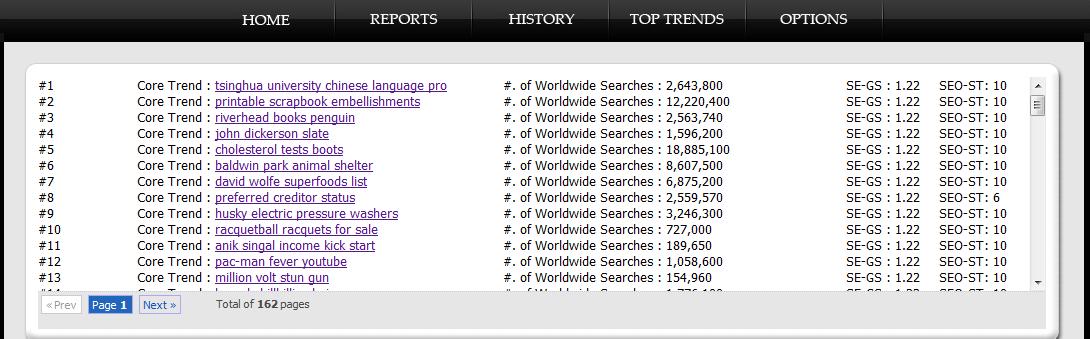
NowRelevant is some sort kind of a search engine that allows you to do extensive searches for your niche. Now this company just launched a software and service called The Internet Time Machine. What is this all about? Short answer is for tactical niche research. What TITM  does is collect the hottest keywords for the past 24 hours. These are either for SEO-types of guys where they more rely on organic rankings or for PPC guys like me who want to get the latest trend. Look:

internet time machine

You can run three different types of searches. One is for SEO-targeted, two is the latest trends which mostly focuses on PPC and third is something that I find unique, the core trend analysis. This type of analysis is mostly targeted to what people are looking to buy right now. Whether it is accurate or not, I would leave it up to you when you try it I guess.

Affiliate Marketing Contest with $20,000 at stake

So to spice things up for their launch, these folks decided to run a massive Internet Marketing Contest wherein you can take home, at minimum, $10,000 all yours! Actually there will just be two winners so each of them will take home 10 grands. How sweet is that?

The contest is open to all I believe and the contest is basically all about creativity and planning skills. The winner of the contest will receive $10,000 and the one who referred the winner will equally receive the same amount. Now what’s easier?

Now there’s a video that’s dedicated to it and I don’t want to spoil that. Here’s the video:


Visit my sponsor: Smarter Search

Filed Under: Internet Marketing, Monetization Tactics, Paid Post Tagged With: internet time machine, niche marketing

LogoBee Review – Another Logo Design Company

by Melvin · May 20, 2010

This is a paid review sponsored by LogoBee

Probably right now, it would be overkill for us to open this blog post emphasizing how important a logo is for branding of websites and blogs. Heck, I covered that here and here already. If you’re not contented you can do a Google Search and find so many articles covering why a logo is a must for every business.

That being said, not having a logo is just a mortal mistake for everyone not just doing online business but any type of real offline business as well.

LogoBee Introduction

logobee review

Here comes another logo design company LogoBee. According to their site, LogoBee is an award winning logo design company that has been in this business for 10 years. Their core focus is creating custom logo designs although they also do some other stuffs like stationary designs, business cards and etc.

They have several packages to choose from. They have Spring Sale Package which does have 3 classifications. The special package worths the cheapest starting at $199 while the Golden Package is priced at $349. After the spring sale, they have 2 more ‘premium’ packages, one is the Express package priced at $499 where you will get a logo design, stationery design, Word template. Their most expensive package is the BundleBee which costs well over a thousand dollar each. It is actually just the same with the express package except for the fact that it is bundled with a free web design into it.

If you’re main concern is just the logo, then I suggest you pick up the Spring Sale Package You can choose from 6 logos, which contains 6 revisions. The only problem here is that they don’t offer a money-back guarantee which actually most logo design companies offer.

The Process

Like any other designing work, LogoBee follows this step by step process which is located in their site as well but for the sake of the readers here I might as well put it here. Here are the step by step process according to them

  1. You can start by visiting the prices section of our web site to find a list of our Logo Design packages.
    Select one which best suits your needs and click on it. You will be directed to a secured online logo design order form. The first part is a personal information questionnaire. Please fill in your name, the company’s name, as well as your email and mailing address.
  2. You will then get a chance to process your payment in real time by using Visa , Master Card AMEX, Discover or PayPal.  You can also send a check, money order or wait until a representative calls to get all the needed information.
  3. After your payment has been received, we will begin working on your logo design project.
    You will be notified by phone or email, and will be given a web address for your own private web page. A team of 2 to 4 designers will collaborate on each logo design project. In 2 -5 business days we will present 6 or 8 initial logo designs (depending on the package).
  4. Your input will be processed accordingly.  We will begin working on your revisions immediately. Simple changes will be completed in one business day.You can take your time on viewing the designs – there is no time limit on any of the packages and unlimited changes apply to Silver, Gold and Express packages.
  5. When all the changes have been completed to your satisfaction and you finalized your logo design, a logo kit will be prepared. You may be asked for stationery information, depending on the package you chose. Your stationary design consists of 1 set of business cards, envelope and letterhead designs. Up to 6 names on the cards are included. The layouts will be viewed and approved on the same private web page and unlimited changes can be applied to your stationary design.

Clients

LogoBee boasts wide variety of clients. In their testimonial page, they have about 6 pages of positive feedback from their clients. Aside from that they’ve also done logos for big companies like Heritage Education Funds, Greenpeace and even some prominent people like Kendra Todd, winner of NBC`s hit show “The Apprentice” and Clinton Hart of the San Diego Chargers.

As with any business model, having clients who are prominent figures always help in terms of boosting credibility in a certain field.

Crowdsourcing vs the Traditional Design Process

I am fortunate enough to have my own sets of designers who do this work for me so I really haven’t done any logo contests projects before. But if you’re starting out from scratch, meaning you don’t have any connection, it would be a little bit tough to find a designer willing to do work for you. In fact, most of the designers that you can find through forums are the crappy ones as most of the premium ones aren’t usually available for work.

LogoBee falls into the traditional design process type of company and Im sure they are in an uphill battle against crowdsourcing sites in which a lot of people are more enticed with.

Final Thoughts On LogoBee

Overall LogoBee is a decent custom logo design company. If not, they probably wouldn’t land a review on this blog. They’ve been in this business for long and they have already that good reputation considering they’ve handled more than a thousand clients.

The downside of course is that it is expensive. A lot of small businesses could easily just head out on forums and find equally talented designers for almost half the price. But that would be another thing since in my opinion LogoBee is targeted to a more established and bigger companies which have bigger funding for these types of work.

Now over to you guys? have you ever had any experience with this team from LogoBee? If you do then I would very much like to hear experience from you. If not, then please check them out at LogoBee.com

Filed Under: Designs, Paid Post Tagged With: logo design, logobee review

Start A Logo Contest at LogoMyWay – LogoMyWay.com Review

Start A Logo Contest at LogoMyWay – LogoMyWay.com Review

by Melvin · Mar 14, 2010

This is a paid review sponsored by LogoMyWay.com

logomyway reviewBy now, you should’ve already realized that logo is probably the most important aspect of your design. Not only that it symbolizes your brand, but also it’s the first one that your audience see when they reach your site. So for a very small space, you already get to express what your site is all about.

One of the common mistakes that I see in most bloggers is that they don’t seem to place that much importance in investing a logo for their site. And much worse is that they don’t even think it’s a necessity for their blog! I know it has been emphasized a lot but Im going to repeat it again, having a high quality logo for your site is a must. That’s the big difference between someone who is serious in his online business from someone who’s not.

LogoMyWay.com Introduction

I was contacted  if I could take a look on the site LogoMyWay.com. The site is basically a crowdsourcing logo design marketplace that connects designers and business owners. Crowdsourcing here is the key. For a minimum of $200 you can get hundreds of talented designers all over the world to design a custom logo for your websites/blogs. The beauty of the crowdsourcing model is that you basically enjoy their concepts yet you’re not obligated to pay all of them. You will only pay the design that you want the most.

Going in depth, this is how the process go:

  1. You basically register with them first, then go on and submit your project description including all your requirements. this includes all the basic stuffs such as your site’s name, your slogan, preferred style, font and the color schemes.
  2. After that you specify the prize you’re willing to give to the winner (obviously the higher the better).
  3. Then your contest will go live, you’ll receive a ton of entries and the good thing is you could rank them up or completely ditch the ones that you don’t like. You could also make adjustments within your contest. If you feel something is lacking, you can elaborate your requirements more.
  4. After the contest ends you can basically pick your winner. The winner gets the money and you then receive Industry Standard Vector Logo Files that can be used in almost any application you choose. (Websites, T-Shirts, Mugs, Pens, Business Cards Etc.).

The process is pretty simple and logomyway handles everything reliably. So far I haven’t really seen or heard any problems about them.

Crowdsourcing vs the Traditional Design Process

I am fortunate enough to have my own sets of designers who do this work for me so I really haven’t done any logo contests projects before. But if you’re starting out from scratch, meaning you don’t have any connection, it would be a little bit tough to find a designer willing to do work for you. In fact, most of the designers that you can find through forums are the crappy ones as most of the premium ones aren’t usually available for work. Another downside is the high cost.

Crowdsourcing on the other hand is perfect especially if you are looking to get as much ideas as possible. And the great thing about it is you’re not committed to pay those people to take time and do designs for you. You just pay the best design, no questions asked. I’d highly recommend this model to you especially if you’re starting from nothing and have no connections at all.

Final Thoughts On LogoMyWay

Overall I can say LogoMyWay.com is a pretty decent crowdsourcing site. The only other site that I see competing against them is 99designs.com w/c is more established due to the fact that it has been in the business for a long time.

The one key advantage that I see in using this logo design company is that it solely focuses on logo and for me it’s always a plus to be with a company that specializes in only ONE thing.

In terms of quality of logos, just by browsing the current logo contests you can rest assure that the designers participating there are top-notch designers and that would be evident with the logo entries.

What do you think guys? Have you ever had any experience (both good and bad) with LogoMyWay? I know the owner would be very happy to get your insights about them by using the comment form.

Filed Under: Designs, My Products, Paid Post, Social Media Tagged With: crowdsourcing, logo contests, logo design, logomyway

  • « Go to Previous Page
  • Page 1
  • Page 2
  • Page 3
  • Go to Next Page »

Copyright © 2026 · No Sidebar Pro on Genesis Framework · WordPress · Log in