
This post is actually an entry to Jim’s The Net Fool Christmas Contest. This by far is the post that I have spent so much time writing and proof-reading. Could be easily one of the better post for this sucking blog. 🙂
As like what I have said before, affiliate marketing is a very nice way to make money online but not everyone really succeeds on it. I’m not even sure to say I am successful with it, how is success being defined anyway? 🙂
Anyways in this post I would talk about how I run email submit types of offers. Email Submits is one of the easiest offer to promote and if done and tweaked properly, it can yield a good revenue for you without that much worrying with the expenses
So enough with those lines let’s start. Two things first. First, I would want to say this is how I do it and of course I am not a super affiliate. Second, I am afraid this is not a dummy guide so you cannot accept this information as a goldmine. Let’s just say everything here is two cents! 🙂
I would like to explain everything as spontaneous aems possible. I’m afraid if you’re a complete newbie, you’ll have a hard time getting it. Here we go. First is you have to pick an offer from an Affiliate Network, Market Leverage as an example. In this walkthrough, I would use email and zip submits to start with as I am currently obsessed promoting those stuffs today.
When picking an offer, try to think as possible. You always have to choose what is in demand and unique or else you’re not gonna go anywhere. For example, during the time when Obama and McCain are battling for the Presidency there are ton of email submit types of offer that pays $1.50 that relates to it. You see, during that time I was running campaigns related to that and easily made $200 on a week. The point here is that you have to go to a niche wherein there is a lot of interest from people.
Another thing you have to look for is the site’s landing page. Why? Because , it plays a part on your campaigns converting or not too. If the certain offer’s landing page isn’t that good enough (to attract customers) then you might be wasting your effort with it. Remember that we are just running an email submit so the landing page of an offer is just important. So as an example I will pick the UK Macbook email offer:
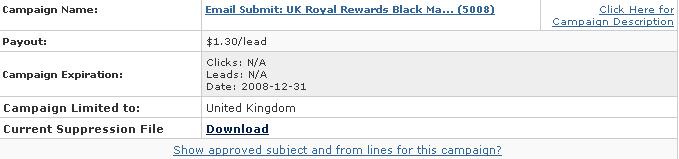
Now that we have picked an offer, we have to choose whether we are going to direct link to it or build a landing page. Direct linking is just simply just sending your visitors directly to the offer’s page while w/your own landing page, you can do a page and have them click on the link that will send them to the actual offer.
For a nice read about them, here’s Clickconsultants article about their comparison. But well for email and zip submits that we are using here, I just recommend linking to them directly as I just feel its not necessary for a landing page for this types of offer. One thing when you direct link is that Google increases your price per click. Another is that you are not going to get organic/natural traffic from search engines. Don’t worry these are just minimal disadvantages because what we are running here is just a simple email submit.
Now we head on to Adwords (what I often use). If you don’t have an Adwords account, signing with them is free (unlike YSM that you have to deposit some dollars!) Now that you are in Adwords and ready to start a campaign, click the create new campaign, keyword targeted. The first part is all basics like naming your campaign, naming your ad group and what language. But one thing most newbies forget to set is the country that they are targeting. I believe by default it is set to your own country (Philippines here for instance). Look what countries the email submit offer is accepting then choose it. For our offer the country is United Kingdom
Now we’re gonna create our ad. In creating there isn’t really anything that can be said right. Actually its all about testing what will work out and what will not. Don’t set a campaign that has only one ad group in them. Try to put as many ad groups on a campaign as you can targeted with specific keywords grouped on each. We are gonna use them lately as monitoring channels on how our campaign is working. But as always, try to be honest as possible. Don’t fool them with your deceptive ads. Remember we are looking for conversions and not just clicks. For our example I made something like this:

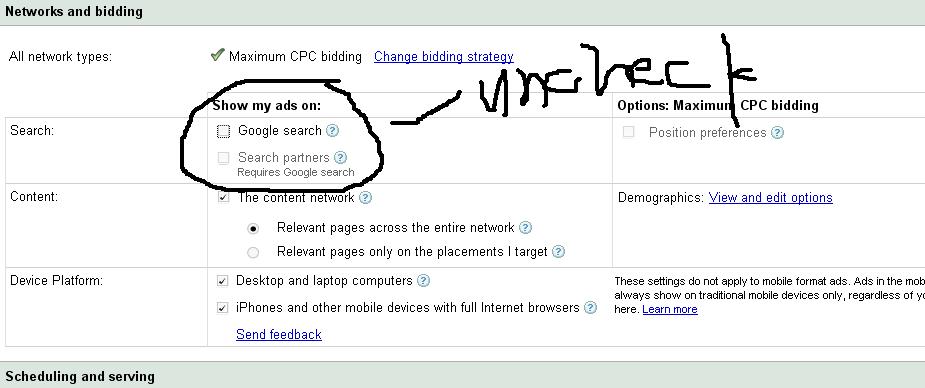
Oh and I forgot that when you create a campaign, try to disable the search. We will be getting our clicks from content networks and not from the search engine and besides we are direct linking to an offer so we’re immediately disqualified for the search. For disabling the search, here’s a screenshot I did.
 Now we’re on Keywords. Remember when choosing keywords, don’t just dump ten million keywords on your list. Most of the terms, you’ll realize are just junk terms that have low volumes. It is believed that search engines penalize us by doing so. It’s important to just stick with what really the offer is all about. Also you can see above that I append the term {keyword} at the end of the destination URL. It allows Google to dynamically insert the keyword that was searched for when the person clicked on the ad. This will allow you to run reports later on to see which of your keywords convert best. You can use the Google Keyword Tool as it gives a basic overview of what to expect on keywords and the number of searches they have and stuffs like that.
Now we’re on Keywords. Remember when choosing keywords, don’t just dump ten million keywords on your list. Most of the terms, you’ll realize are just junk terms that have low volumes. It is believed that search engines penalize us by doing so. It’s important to just stick with what really the offer is all about.
Also you can see above that I append the term {keyword} at the end of the destination URL. It allows Google to dynamically insert the keyword that was searched for when the person clicked on the ad. This will allow you to run reports later on to see which of your keywords convert best. You can use the Google Keyword Tool as it gives a basic overview of what to expect on keywords and the number of searches they have and stuffs like that.
Now that we have set our keywords, its time to set our pricing. Now most people starting out are afraid to shred budgets for a campaign. So for this email submit, we would be using a low budget campaign. Normally I do set my daily budget to $10 -$20 a day for these types of offer. Now while we want to be in a low budget type, what we don’t want here is to blow our budget. While our budget is just $20 a day, we still should spend the money like we are a hardcore marketer. What do I mean? Don’t bid on clicks for $0.01 or slightly higher than that. For these types of offer I normally bid $0.5 up to $1 (it depends still on what you are offering).
When I start campaigns, what I normally want even from the start is the volume. In getting the volume, you could easily scale your campaigns and do the necessary adjustments. But for newcomers, I suggests you just bidding $0.3 -$0.7 when starting. Unless you’re getting frequent payout increases like I do, then you might not want to bid just a cent w/what the payout is. 🙂 Don’t worry because the first few days is pretty much for testing, and optimizing. Remember that we set a low budget that we could definitely afford so theres nothing much to worry about our Adwords Bill at the end of the month.
So whats next? Now that we have everything set up, we just need to analyze and do more testing. For this, I do normally check the stats every afternoon and do the adjustments and then check again the stats before I sleep at night. Because we are direct linking, we don’t need to care about things like bounce rate.
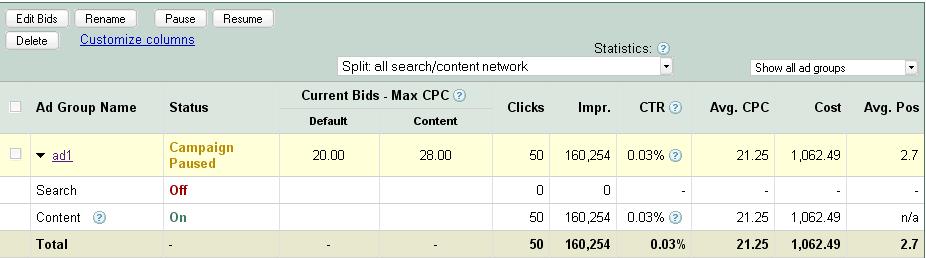
If you go at your campaign descriptions, you will definitely see what is the position of your ad, the impressions, the clicks and CTR. If you’re position is too low, try to increase your bids. If you’re getting a lot of impression but no clicks, then try to rewrite the ad. You might also need to rotate different ads to see what’s the best performing ad. Take a look at this:
Now remember in affiliate marketing, you’ll have to keep punching. You must have the balls to see what isn’t working and what is working. Doing the right things, doesn’t mean ending up with the best results. Test and test and test and you’ll see. When will you start generating leads? As soon as you’re getting clicks! We are direct linking and we are promoting an email submit offer (remember it!) so it’s not that hard to convert a click to a profit.
Learn how to develop the best keyword strategies for a solid SEO foundation.
Although the “per lead” price tag is not big, it can be better for anyone to test these types of offer as they are low-risked. Maybe I can write more about how I monitor my campaigns on the future posts… 🙂