
I was bloghopping for the past 30 minutes with some blogs within my niche and noticed something in common.
So today I’m going to make a really quick article about protecting your wordpress folders and directory. A lot of bloggers I’ve noticed, have their blog’s folders browsable which is NEVER a good idea. I’d pick a cool kid name Desmond from DesmondBlog as an example. If you type the url desmondblog.com/wp-content/uploads you could pretty much see everything in the folder:
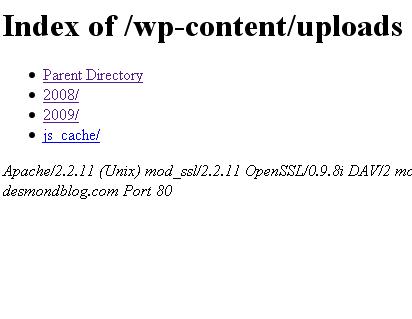
Seeing the whole content of the uploads folder is no bad (who cares about it?). But because his blog’s subfolders are browseable, we could pretty much view his themes @ /wp-content/themes (and get his premium themes),as well as its subdirectories and how about the plugins folder located at wp-content/plugins? Hackers could just go in it very simple and discover that you actually run an out-of-date wordpress plugin and exploit in it.
What should you need do then? Simply go to .htaccess file and put “Options – Indexes” on any line and save. The little code prevents your wordpress folders from being accessed by anyone. The second option if you only want to restrict access to some selected folders is just by creating an index.html file and uploading it to your desired folder. Say you just want your plugins folder to be the one unaccessible, then go to it and upload the html file. That simple! 😀
Like what i’ve said for every 10 blogs that I visit, 7 of them are usually unprotected. You could let them know it by sharing this post (or just simply telling them. 😉

Ok good to know this. thanks for share, one little question thou..anything special you have to put in the index.html?
Salwa’s last blog post..Traffic Monday: How to Get Tons of Web Traffic Using Your Article Resource Box
Hey, just wanted to say thanks again for letting me know about this at Blogussion! I put it on my personal blog too.
I thought something like that would just be automatically done? =/ Maybe I removed it by accident before not knowing what it does..
Alex Fraiser’s last blog post..Thesis Thursday #2: 10 Greatly Customized Thesis Blogs + Thesis Customization Tips
nope, just a blank page named index.html. It’s used just in case you just want a specific folder not to be accessed.
Melvin lots of thanks for reminding me about this. I had heard of it before but I always forgot. I checked my important folders and put in a index file.
I wrote on the index.html file – Dude you are in wrong place. Visit Home Page “my blog url”
I will spread the word about this. Thanks again.
Agent 001’s last blog post..Dean Hunt – The Million Dollar Personal Brand – Interviewed
Thanks for sharing this!
I never knew of this before.
Paulubiadas’s last blog post..Miscellaneos Ramblings
sorted :D, thanks!
Salwa’s last blog post..Making Yourself Identifiable In The Blogging Community
Lol thats hilarious! anyways thanks. 😀
Awesome tip…. and you know what I think I have neglected to do this yet on Real Blogging Tips!!
I will check it out this afternoon.
Forest’s last blog post..Under Construction… What Do You Think?
really, a blog could be easily stolen as that? this is an informative posts for all those wp users (im a blogger user) who just park their blogs across the street and go for a nap.
could this happen to blogger too>?
elmot’s last blog post..They Are No Angels Either!
Personally, I prefer the .htaccess approach. Some time ago, I also noticed this and tried to secure my folders using blank index.php files and for some reason WordPress complained about it (weird 404 errors, redirections, etc).
Héctor | SEO Blog’s last blog post..SEO And Domain Name Changes, Advisable?
Now that is a very useful post, Melvin. I’d be bookmarking this for future reference – who knows I just might get to move to WP finally. “,)
dud, why are you not using wordpress on the first place?
Because I started on the wrong foot and kept on – as a matter of pride and force of habit. Not to worry, I’d be getting myself a self-hosted WP blog very soon. lol
jan geronimo’s last blog post..Bah! You Can Curtsy Now – I’m an Influential Blogger
Hey Melvin, first of all, I felt like you just raped my blog. 🙂
Secondly, thanks for informing about this. I’m the worst when it comes to techie stuff like this in the internet marketing world. LOL.
Thirdly, I didn’t know that I’m a cool kid. 😆
Anyway, thanks for telling this. 😀 (and i appreciate the link)
Desmond Ong’s last blog post..What Happened When John Reese, Ed Dale, Frank Kern, Mike Filsaime and Jeff Walker Do a Gathering
I know alot of /plugins and /themes folders are viewable… but do you actually steal the files? if you call the folders.. it gives you system errors.
Mke
Mike’s last blog post..WordPress 2.8 Beta 1 Released
Nice post Melvin. I honestly hadn’t even thought about that, but as I’m getting a custom theme made I’ve not put up an index.html file before I forget.
It just says ‘Hey, guys, GO HOME!!!’ with a link to the homepage 😉 lol
Simon | Teenius’s last blog post..The Positives And Negatives Of Joint Ventures
Hey Melvin, I never knew this, thanks for letting me know!
Charles @ Big Idea Blogger’s last blog post..Proven Money-Making Ideas – The Big Four Categories
nice tips for those who are not aware of their wordpress file being exposed in browsing
crisiboy’s last blog post..Blackberry Phone Enters the Philippines
That’s a little scary but seeing it’s all images I don’t think I mind so much! I think it’s like that because the content isn’t very secret right?
what the??!! is that even possible??to hack your wordpress folder?? i never knew that. better try your suggestion on how to protect our wordpress file
francis’s last blog post..The World Ends With You NDS Review
Melvin, Before reading your post I don’t know about it that a blog can be stolen. I keep it in mind. thanks for such nice info and sharing.
Great tip Melvin.
I will add it now.
Thank you very much.
Nihar’s last blog post..How to submit Website / Blog to Bing Webmaster Tools
this is a great tip
.-= infopediaonlinehere´s last blog ..Google App Engine technologies, Google App Engine SDK, Google cloud computing google app engine =-.